Mixtapes
Side A. Side B. Your rules.
Pick a C-60, C-90 or C-120 and fill both sides. Paatu Cassette keeps the timing honest and flips the tape for you.
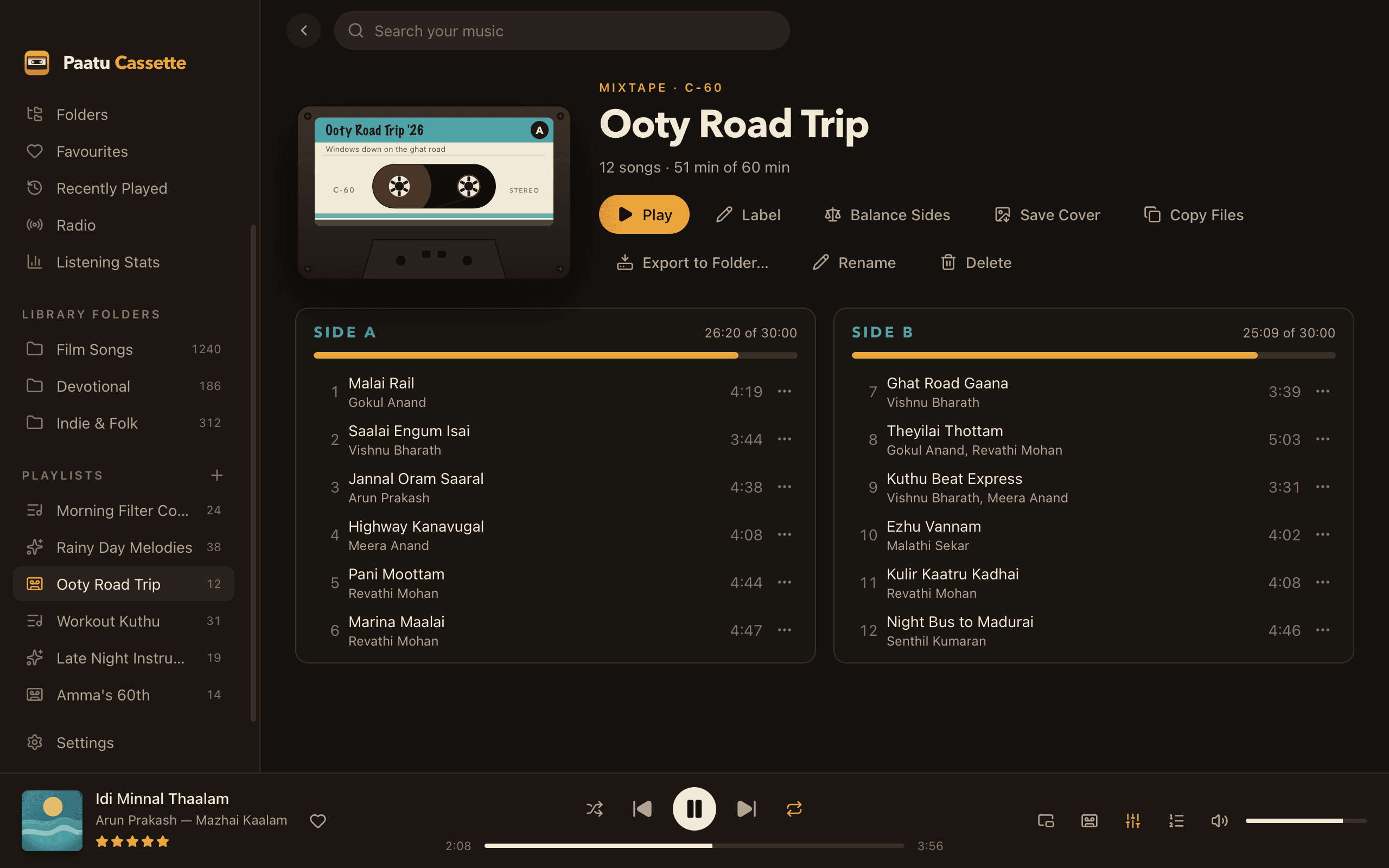
Real tape lengths
C-60, C-90 or C-120: 30, 45 or 60 minutes a side.
Two sides
Songs fill Side A first, then Side B, with running times against the limit.
Balance Sides
One click evens out the two sides, keeping your order.
Your label
Label text, a note for the cover, and eight colours.
Flips mid-way
Play runs Side A, then turns the tape over for Side B.
Save the cover
A PNG of the cassette with both track lists, ready to share.
The art of the mixtape
A mixtape isn’t just a playlist: it has a length, two sides and an order that matters. Paatu Cassette keeps all of that. Each side shows its running time, and turns red if a song won’t fit, just like running out of tape.
When it’s done, Save Cover makes an image of your cassette and track lists for WhatsApp or Instagram, and Export to Folder… puts the whole tape on a pen drive in order.
Help
Learn how to use it
- Make a mixtapeFill Side A and Side B of a C-60, C-90 or C-120, then save the cover.Read the guide →
- Copy songs to a pen drive or car USBPut a playlist on a USB drive in order, ready for the car.Read the guide →
- Create and manage playlistsMake a playlist, add songs, reorder, rename and delete.Read the guide →
Related
Goes well with
- PlaylistsPlaylists & smart playlistsDrag songs onto a playlist, or let a smart playlist fill itself from rules like year, music director, rating and play count.
- Pen driveCopy to pen drivePut any playlist, album or mixtape on a pen drive in the right order, ready for your car stereo.
- Now PlayingCassette Now PlayingThe hubs spin, the tape winds from reel to reel as the song plays, and a spectrum visualizer dances underneath. Your queue sits right beside it.
Press play on your own music.
Free download for Mac. Your songs stay on your Mac, exactly where they are.
Free · macOS 11 Big Sur+ · Apple Silicon (M1 or later) · Windows coming soon